New SolidWorks weekend intake starts 18 Aug — limited seats available.

03-8063 0414

Finance courses

Financial Modelling Essentials

Develop practical financial modelling skills with our 2-day, HRD Corp claimable Financial Modelling Essentials Training Course at CAD Training Centre. Master Excel financial statements, ratios, forecasting, valuation, and model development using case studies. Physical, online, and in-house classes available

  • Duration 2 Days
  • Level Intermediate
  • Format Face-to-face

About this course

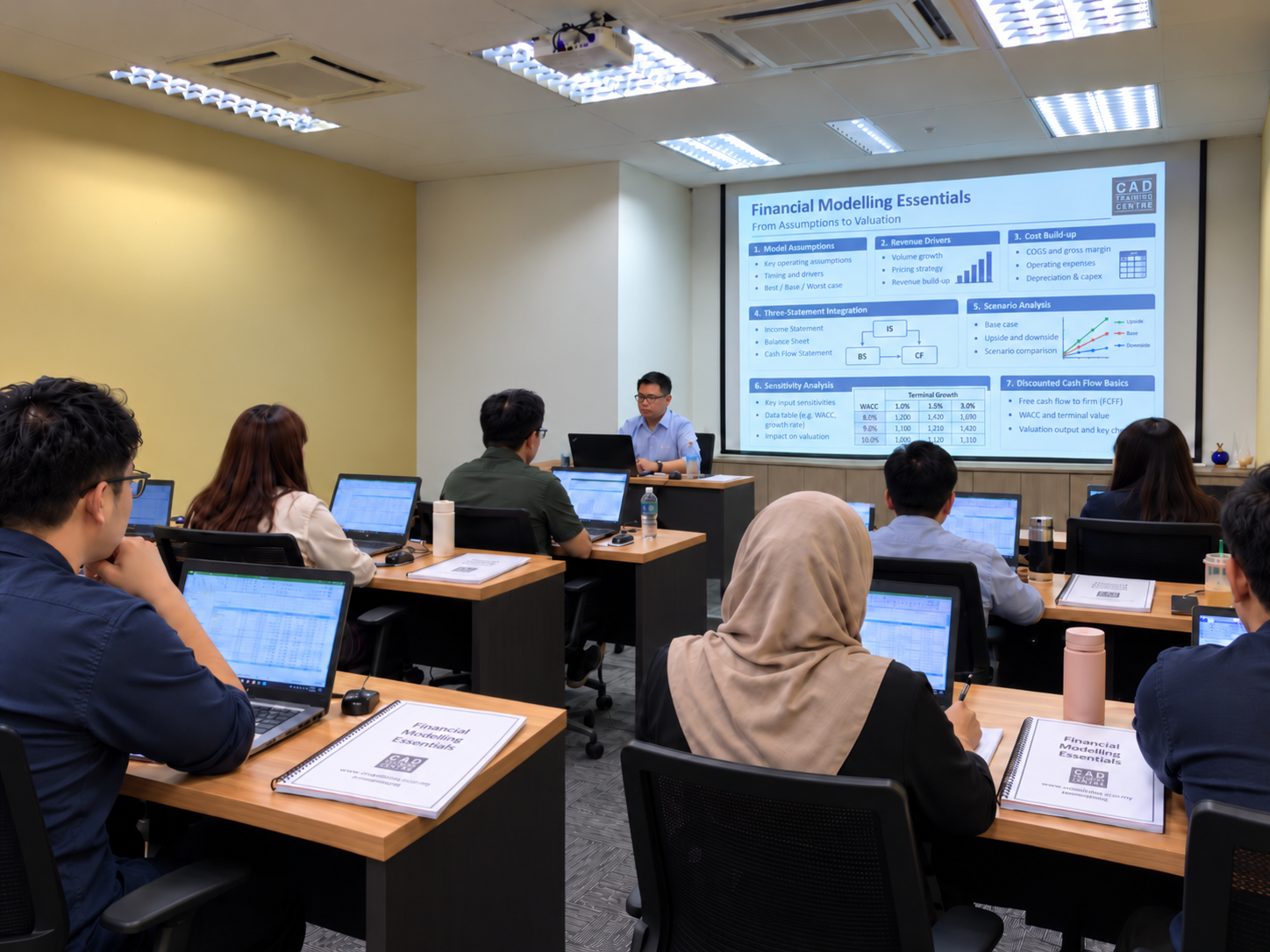
 The Financial Modelling Training Course at CAD Training Centre is a comprehensive 2-day or 3-day course (more advanced), HRD Corp claimable program designed for business analysts, finance professionals, managers, and corporate decision-makers in Malaysia. Spanning foundational Excel modeling to real-world case studies for SMEs and public-listed companies, this beginner-friendly, hands-on workshop covers financial forecasting, ratio analysis, and strategic scenario planning. Training is available physically in Puchong, Selangor—with laptops provided, or via live online sessions, complete with a certificate of completion and free repeat classes.

Financial Modelling is a powerful analytical tool that involves creating a dynamic representation of a company’s financial performance through mathematical models. This intricate process allows individuals to project future outcomes, assess risks, and make informed decisions crucial for success in the dynamic world of finance.

Financial Modelling serves as a bridge between raw financial data and strategic decision-making. From startups seeking to attract investors to established corporations optimizing their operations, the ability to create accurate financial models is a skill that transcends industries. Investors use financial models to evaluate the potential return on investment, while companies employ them to guide resource allocation and strategic planning.

This course covers three essential modules, beginning with an introduction to financial modelling, its importance in business decision-making and the different types of financial models. Participants will explore the benefits and limitations of Microsoft Excel before learning essential spreadsheet techniques, including keyboard shortcuts, data management and formula creation. The day also introduces intermediate and advanced Excel features such as relative and absolute references, data validation, Goal Seek, Scenario Manager, What-If Analysis, conditional formatting, form controls and charts. Day 2 introduces three additional modules focusing on developing financial models and analysing business performance. Participants will build a financial model from scratch using an SME case study, perform financial ratio analysis and develop a second model using a public-listed company case study. The programme also introduces financial statement analysis, valuation techniques and financial model testing.

Sessions run 9am–5pm at our Puchong training centre.


Related Links

https://www.investopedia.com/terms/f/financialmodeling.asp
https://www.ibm.com/think/topics/financial-modeling
https://www.youtube.com/watch?v=AYyzkfkeE-8
https://www.onestream.com/blog/financial-modeling-in-corporate-finance/
https://www.wallstreetprep.com/knowledge/financial-modeling/

Learning Outcomes

  • Understand the fundamentals of financial modelling, including its purpose, benefits and applications in business decision-making.
  • Apply Microsoft Excel tools, formulas, functions and keyboard shortcuts to organise financial data and develop structured financial models.
  • Use intermediate and advanced Excel features, including Goal Seek, Scenario Manager, What-If Analysis and data validation, to support financial calculations.
  • Build financial models from scratch by entering financial data, developing formulas, generating charts and testing model calculations.
  • Analyse financial statements and apply financial ratios to evaluate company performance and identify potential financial problems.
  • Understand how financial modelling supports forecasting, financial projections and investment decision-making.
  • Explore financial valuation techniques through practical case studies involving SMEs and public-listed companies.
  • Develop analytical and problem-solving skills through financial model development, business case studies and model testing.

Who is it for

  • Finance and accounting professionals who want to develop practical Microsoft Excel financial modelling and analytical skills.
  • Business analysts and data analysts responsible for evaluating business performance, financial information and business projections.
  • Business owners and entrepreneurs who want to understand financial models and evaluate business opportunities.
  • Managers and executives responsible for financial planning, business analysis and investment decisions.
  • Investment and financial analysis professionals who want to strengthen their understanding of financial models and valuation concepts.
  • Students, fresh graduates and working professionals with basic finance and Excel knowledge who want to develop financial modelling skills.

Course outline

Module 1

Day 1 — Introduction to Financial Modelling

  • Understanding what financial modelling is
  • Exploring why financial modelling is important in business decision-making
  • Understanding the benefits and pitfalls of Microsoft Excel
  • Exploring the different types of financial models
  • Identifying the benefits of using financial models for business analysis
  • Understanding the steps involved in building a financial model
Module 2

Basics in Microsoft Excel

  • Getting started with Microsoft Excel for financial modelling
  • Learning essential Excel keyboard shortcuts
  • Understanding how to work with financial data in Excel
  • Creating formulas for financial calculations
Module 3

Intermediate and Advanced in Microsoft Excel

  • Working with date formulas
  • Understanding relative and absolute cell references
  • Applying data validation techniques
  • Using Goal Seek to determine the input required to achieve a desired result
  • Applying Scenario Manager to compare different financial assumptions
  • Using What-If Analysis to examine changes in financial outcomes
  • Understanding and using the Excel Camera Tool
  • Applying conditional formatting to highlight financial information
  • Working with form controls in Microsoft Excel
  • Using Excel functions for financial calculations
  • Creating charts and graphs to present financial information
Module 4

Day 2 – Building a Financial Model (Case Study 1 – SME)

  • Creating a financial model from scratch
  • Entering financial data into Microsoft Excel
  • Building formulas for financial calculations
  • Creating charts and graphs to present financial information
  • Testing the financial model
  • Applying financial modelling techniques through a Small and Medium Enterprise (SME) case study
Module 5

Financial Ratio Analysis

  • Understanding financial ratios and their importance in financial analysis
  • Using financial ratios to analyse a company
  • Evaluating company performance using financial information
  • Identifying potential problems with a company's financial performance
Module 6

Preparing Financial Models (Case Study 2 – Public Listed)

  • Building formulas for financial modelling calculations
  • Creating charts and graphs for financial analysis
  • Testing the financial model
  • Applying financial statement analysis
  • Exploring financial valuation techniques
  • Applying financial modelling and analytical techniques through a public-listed company case study

Course format

Choose the delivery mode that fits your team and timeline.

  • 01

    Classroom

    Instructor-led sessions in our Bandar Puteri labs with guided exercises, live demos, and peer discussion.

  • 02

    Online

    Live virtual delivery with the same syllabus, shared files, and instructor checkpoints — ideal for distributed teams.

  • 03

    In-house

    Private cohorts for your organisation, scheduled around project deadlines with content tailored to your standards.

Upcoming schedule

Public intakes coming up.

  • 23 Nov 2026 - 24 Nov 2026 9:00 AM – 5:00 PM · Face-to-face

Certification & policies

Certificate of attendance

Receive a certificate of attendance upon completing the programme, suitable for HR records and continuous learning portfolios.

Free Repeat Class

Free Repeat Class: if you need another pass at the same public syllabus within 6 months, you may re-attend subject to seat availability.

Materials provided

  • Course workbook / digital notes
  • Exercise files and sample templates
  • Certificate of attendance
  • Post-class support window for clarification questions

Frequently asked questions

01 What is the Financial Modelling Essentials course about?

Our Financial Modelling Essentials Training Course helps participants develop practical skills in creating and analysing financial models using Microsoft Excel. The programme covers financial modelling fundamentals, Excel formulas and functions, financial ratio analysis, financial statement analysis and valuation techniques. Participants will learn how to develop financial models from scratch, evaluate company performance and use financial information to support business decisions.

02 Is the Financial Modelling Essentials course suitable for beginners?

Yes. The course is suitable for participants who are new to financial modelling but already have some understanding of finance, accounting and Microsoft Excel. The programme begins with financial modelling fundamentals and essential Excel techniques before progressing to more detailed spreadsheet functions and practical business case studies. Basic familiarity with financial statements, including the Income Statement, Balance Sheet and Cash Flow Statement, is recommended.

03 What is the difference between Financial Modelling Essentials and Financial Modelling Intermediate?

Financial Modelling Essentials is a 2-day programme covering financial modelling fundamentals, Microsoft Excel techniques, financial ratio analysis and practical case studies involving SMEs and public-listed companies. Financial Modelling Intermediate is a 3-day programme that includes the same six foundational modules from the Essentials course, followed by an additional day covering time value of money, Discounted Cash Flow (DCF), financial valuation, sensitivity analysis, scenario analysis, project finance and common financial modelling mistakes. The additional third day is suitable for participants who want to develop more detailed valuation and investment analysis skills.

04 What is the difference between Finance for Non-Finance Professionals and Financial Modelling Essentials?

Finance for Non-Finance Professionals is a 2-day introductory programme designed to help participants without a finance background understand financial statements, financial ratios, budgeting, credit analysis and basic financial management concepts. Financial Modelling Essentials is a separate 2-day programme focusing on using Microsoft Excel to develop financial models, perform financial calculations, analyse company performance and explore valuation techniques. Finance for Non-Finance Professionals focuses on understanding financial information, while Financial Modelling Essentials focuses on applying financial information through structured Excel models.

05 What Microsoft Excel skills will I learn during the Financial Modelling Essentials course?

You will learn how to use Microsoft Excel to organise financial information, create formulas, perform calculations and develop financial models. The course covers keyboard shortcuts, date formulas, relative and absolute cell references, data validation, Goal Seek, Scenario Manager, What-If Analysis, conditional formatting and form controls. Participants will also practise creating charts and graphs to present financial information clearly.

06 Will I learn how to build a financial model from scratch?

Yes. Day 2 includes a dedicated module on building a financial model from scratch using an SME case study. Participants will learn how to enter financial data, create formulas, generate charts and graphs, and test the model. The programme also includes a second case study involving a public-listed company, where participants will apply financial statement analysis and valuation techniques.

07 What is financial ratio analysis, and how will I learn to use it?

Financial ratio analysis involves using information from a company's financial statements to evaluate its financial performance and position. During the course, you will learn how financial ratios can be used to analyse companies and identify potential financial problems. Participants will apply ratio analysis as part of the financial modelling exercises to strengthen their ability to interpret business performance.

08 What types of companies will I analyse during the Financial Modelling Essentials course?

The programme includes two financial modelling case studies. The first focuses on a Small and Medium Enterprise (SME), where participants build a financial model from scratch. The second involves a public-listed company and introduces financial statement analysis, valuation techniques and model testing. These case studies allow participants to apply financial modelling skills to different business situations.

09 How long does the Financial Modelling Essentials course take?

The course takes two days, with training sessions running from 9:00 AM to 5:00 PM Day 1 focuses on financial modelling fundamentals and Microsoft Excel techniques. Day 2 covers building financial models, financial ratio analysis and practical company case studies.

10 Will I receive a certificate after completing the Financial Modelling Essentials course?

Yes. Participants receive a Certificate of Attendance after completing the Financial Modelling Essentials Training Course.

11 What language is the Financial Modelling Essentials course conducted in?

The training is conducted bilingually in English and Bahasa Melayu.

12 Is the Financial Modelling Essentials course HRD Corp claimable?

Yes. Our Financial Modelling Essentials Training Course is HRD Corp claimable, subject to the applicable eligibility and approval requirements.

13 Is there a surau (prayer room) available at CAD Training Centre?

Yes, we have a surau available at our training centre in Puchong. Muslim participants can use the prayer room during breaks throughout the training day.

14 Can I attend Financial Modelling Essentials training online instead of in a classroom?

Classroom training means physical attendance in Puchong with face-to-face guidance and co-learning with other participants. Online training runs live via Zoom with hands-on, screen-shared exercises, better if you're outside the Klang Valley or want to save on travel time.

15 Can I repeat the Financial Modelling Essentials course if I need more practice?

Yes, free repeat classes are offered, no questions asked, if you need a refresher.

Next step

Register your interest

Share a few details and we will confirm seats, HRD Corp claimability, and the best public or in-house option for this course.

Training type